Move off Dynamics NAV before it moves on without you.
Microsoft is sunsetting Dynamics NAV. We migrate you to Business Central — starting with a fixed-fee readiness assessment that runs a read-only scan of your own NAV database and comes back with a customization inventory, the compatibility-level gate, and a costed rewrite lane. Conversion and testing are then delivered by a senior engineer, AI-assisted. The cutover becomes a planned event, not a fire drill.
Month end is slow. Here is where we look first.
A narrated walk-through of where we look first in NAV and self-managed Business Central: the job schedule, change logging, blocking, the service tier and the network path. Captions are in the video; turn the sound on to hear it.
Read the transcript
Month end. Posting takes forever, reports fall behind, and people start clicking again. Sound familiar?
In NAV and self-managed Business Central, the answer isn't always on that screen.
Start with the job schedule. Does a month-end report overlap recurring jobs, integrations, or active users? Compare the longest-running reports with their database work.
Then check change logging. Which tables and fields are enabled, and what retention policies apply?
In SSMS, follow the blocking chain. Review large tables, index usage, and SIFT maintenance, not just a fragmentation percentage. More companies and growing data change the workload, but they don't prove the cause.
Count the service tier instances. Check how requests, reports, and background tasks are assigned. Confirm the application and platform builds, including the cumulative update.
On-premises or in the cloud, follow the storage and network path. Where are your reports connecting? The primary database, or a readable secondary with routing correctly configured?
From NAV to current Business Central, Veltheon brings application, database, architecture and cloud evidence into one investigation. Our founder, Neeraj Kumar, brings two decades of enterprise experience across hundreds of systems. AI assists the analysis. Engineering judgment remains accountable.
Still on NAV or self-hosted Business Central? Let's understand today's bottleneck and your path forward. Book a free thirty-minute discovery call. No cost, no obligation. Tell us what's happening, ask your questions, and get a clearer next step.
Veltheon. Visit veltheon.ca/connect.
The clock is already running
Mainstream support for Microsoft Dynamics NAV is ending, with the extended runway closing January 11, 2028 [verified]. NAV customers worldwide are facing the same forced decision: re-platform to Dynamics 365 Business Central, or run an unsupported ERP at the core of the business. Waiting does not make the problem smaller — it shrinks the pool of qualified partners while every other NAV customer queues for the same migration windows.
Veltheon treats this as an engineering problem, not a re-keying exercise. The assessment runs a read-only collection against your NAV database's own SQL catalog and NAV's own object metadata, and diffs it against a stock NAV baseline. That produces evidence — which objects are customer customizations, which are ISV add-ons, where the schema has drifted from stock, what the SIFT keys are costing you in write amplification, and whether the database clears the compatibility-level gate Microsoft's migration path requires — before anyone commits to a budget. A senior engineer reads that evidence and writes the plan. You get a defensible plan first, then a clean, tested cutover.
Which Business Central you land on changes what happens next. The source is always the same — Dynamics NAV on-premises, on a SQL Server instance we can read. The destination is a choice. Business Central online is a SaaS tenant on an Azure SQL database Microsoft administers, and nobody outside Microsoft holds a SQL surface on it: after that cutover there is no Management Studio, no index to add by hand, and performance work moves entirely into AL, keys and SIFT, partial records, DataAccessIntent and Application Insights telemetry. Business Central on-premises keeps the SQL Server underneath, and keeps every database-layer lever with it.
That is not an argument for either one — it is the trade a migration plan has to state out loud, because it decides who can help you the day something gets slow afterwards, and it is routinely left unsaid until it is discovered. If the destination is on-premises, the database-layer work is described on the tuning page, which draws the same line.
To be exact about the boundary, because it is the question a technical buyer asks second: the scanner reads your database — object IDs, names, types, columns, SQL types, row counts, indexes, and the SIFT materializations. It does not read C/AL or AL source code, and we do not run a code parser, a dependency-graph builder, a C/AL-to-AL converter, or a test generator. Those are engineering tasks a senior engineer performs with AI assistance, priced as engineering. Any vendor telling you a machine converts a customized NAV estate unattended is selling you the first draft and charging for the remainder.
The same collection answers a narrower and cheaper question, and plenty of teams start there: why is this estate slow now, separately from whether it should move. Database Performance Tuning is that engagement — the SIFT cost analysis and the compatibility-level statistics work described above, followed by a senior engineer doing the tuning and a re-measurement on the same basis. The engine underneath both is DB Observatory, and you can read a full assessment it generated on the sample report before speaking to us.
How a Veltheon migration runs
- /01
Readiness assessment (fixed fee)
A scoped 2–3 week engagement, and the part that is genuinely automated. Your DBA runs a read-only query pack — you review every statement first — and the analysis engine turns the output into a customization inventory by object-ID range, a schema-drift report, the compatibility-level verdict, a SIFT cost analysis, and a rewrite-lane effort band in person-days [est.]. A senior engineer adds the risk register and the phased plan. You leave with a plan you could hand to any partner — including a competitor.
- /02
Customization inventory & schema-drift analysis
The scan enumerates every object in your NAV metadata and sorts it by Microsoft's object-ID ranges — base, per-customer (50,000–99,999), Microsoft localization, ISV/RSP, AppSource — so nothing custom is missed and nothing base is billed. It then diffs your physical schema against a stock NAV baseline to surface custom fields on stock tables, SQL type drift, missing stock columns, unused stock tables and index drift. Table objects get a per-object effort band [est.]; reports, pages and codeunits are inventoried and explicitly not priced by the scanner, because pricing a rewrite means reading the code, which is the functional team's job. Separating live custom logic from obsolete customizations that should be retired rather than carried forward is a judgement a senior engineer makes in the workshop, with your team in the room.
- /03
Code conversion to AL extensions — engineer-delivered
A senior engineer rewrites your customizations as AL extensions aligned with the "no-customization-of-base" model, using AI as a drafting assistant the way any modern engineer does — not as an unattended pipeline. We do not operate a C/AL-to-AL converter, and we would not trust one on a posting routine if we did. The inventory from step 2 is what makes this predictable: the work is scoped object by object before it starts, and a human owns correctness and sign-off on every unit.
- /04
Test coverage & data validation
A senior engineer writes AL test codeunits and reconciliation checks — again AI-assisted, human-owned — so posted financial results, inventory valuation, and key reports match the legacy system before go-live, not after the first month-end close in production. The trial-balance reconciliation is the one piece the scanner already prepares for you: it verifies up front that your G/L has the structure a to-the-cent checksum needs, per company, so the validation is possible before anyone relies on it.
- /05
Cutover, hypercare & handover
Dress-rehearsed cutover with a documented rollback path, followed by hypercare and a clean handover to your internal team or your existing Microsoft partner. No lock-in to Veltheon as a condition of success.
What the scanner does vs what the engineer does — the honest split
Enterprise diligence reads every claim, and "AI-powered migration" is the most over-claimed phrase in this market. So we separate the code that exists in our repo and runs today from the work a senior engineer performs by hand with AI assistance — and we never blur the two. If you ask us to demonstrate anything in the left column on a call, we can.
- Real todayAutomated — our read-only scanner and analysis engine
- Enumerates every object in NAV's own metadata and buckets it by Microsoft's object-ID ranges — Microsoft base, per-customer (50,000–99,999), Microsoft localization, ISV/RSP, AppSource — so the customization inventory is complete rather than sampled.
- Checks the database compatibility level against the minimum Microsoft's Business Central cloud-migration path requires, and reports it as the hard gate it is.
- Diffs your physical schema against a stock NAV baseline: custom fields added to stock tables, SQL type drift, stock columns that have gone missing, stock tables carrying no rows, and index drift.
- Analyses your SIFT / FlowField materializations — the indexed views NAV maintains — with their measured reads against their maintenance writes, which is how a maintained key with zero reads shows up as pure write amplification.
- Prices TABLE objects into per-object effort bands in person-days [est.], and rolls them into a rewrite-lane floor. It refuses to price reports, pages and codeunits, and says so in the report rather than quietly guessing.
- Verifies structurally that your G/L can be proven to reconcile after migration — the right columns, the exact numeric types, a primary key, per company — reading the SHAPE of the ledger and never a single amount.
- Runs strictly read-only. Every statement passes a guard that refuses any non-read verb, at load and again before execution; your DBA reads the pack before running it, and we never need a connection to your box.
- Engineer-deliveredSenior-engineer work, AI-assisted — priced as engineering
- Rewriting C/AL customizations as AL extensions, unit by unit, against the no-customization-of-base model.
- Writing AL test codeunits and the reconciliation harness that proves posted results, inventory valuation and key reports match the legacy system.
- Code-level review of logic changes inside stock objects — the one thing a schema-level scan structurally cannot see, and the reason a pilot exists.
- Deciding what to carry, what to archive and what to drop: the scanner inventories every customization, but retiring one is a business decision made with your team.
- ISV successor work — establishing whether each add-on has a supported Business Central edition, and running the vendor conversation when it does not.
- The cutover plan, the dress rehearsal, the documented rollback path, and hypercare.
- Not automatedMachines we do not have — discount them entirely
- We do not run a C/AL parser or an AL parser. Nothing we own reads NAV object source code; the scanner reads the SQL catalog and NAV's object metadata.
- We do not build an automated dependency graph of your objects. Impact analysis is engineering judgement informed by the inventory.
- We do not operate a C/AL-to-AL code converter. First drafts are AI-assisted engineering, reviewed line by line.
- We do not auto-generate test codeunits. An engineer writes them.
- The scan deliberately stops short of a Microsoft support-lifecycle verdict for your exact release. Stating that honestly needs a maintained, cited lifecycle matrix, which is on our roadmap and not shipped — so we settle it with you on the call, with Microsoft's page open.
What an AI Migration Readiness Assessment looks like
Below is a worked example for an illustrative mid-market NAV estate: 2,400 total objects, 180 custom objects, and 12 ISV add-ons. The assessment turns a vague "we need to move off NAV" into a costed, risk-rated plan.
These specific figures are invented to show the shape of the deliverable — this is not a client result and not our engine's output. The object counts, range breakdown, schema drift, SIFT costs and per-object effort bands in a real assessment are computed by the scanner from your own database. The weeks, the ISV verdicts and the go-live risk rating are a senior engineer's judgement on top of that evidence.
| Area | Finding | Estimate | Signal |
|---|---|---|---|
| Standard objects | 1,920 of 2,400 objects sit in Microsoft's base range and carry no customization — they are replaced by the current Business Central base app, not converted at all. | ~80% carried by the base app | Quick win |
| Custom logic | 300 of 480 custom/modified objects refactor to AL extensions with AI-assisted conversion plus engineer review. | ~6 weeks | Watch |
| Risky customizations | 14 objects modify base posting routines and a legacy .NET/COM interop — manual rewrite, no safe auto-conversion. | ~4 weeks | High impact |
| ISV add-ons | 9 of 12 add-ons have a supported Business Central edition; 2 need vendor upgrade contracts; 1 is end-of-life and must be replaced. | ~3 weeks + vendor lead time | High impact |
| Data migration | Master + open transactional data migrates via configuration packages; 3 historical tables need bespoke transformation and reconciliation. | ~3 weeks | Watch |
| Test & validation | Engineer-written AL test codeunits across posting, inventory valuation, and the top 25 reports; reconciliation to legacy figures, on the G/L structure the scan confirmed up front. | ~4 weeks (parallel) | Quick win |
| Go-live risk | Medium overall — driven by base-posting customizations and the end-of-life ISV; mitigated by early vendor engagement and dress-rehearsed cutover. | Total: ~16–24 weeks | Watch |
Illustrative only — a real engagement establishes the actual numbers on your data. Object counts, percentages, effort, and risk are examples to show the shape of the output, not a quote.
Engagement & pricing
We start small and de-risk before you commit to the full program. The assessment fee is credited against the migration if you proceed with Veltheon — and the deliverable is yours either way.
| Engagement | What you get | Timeline | Fee |
|---|---|---|---|
| AI Migration Readiness Assessment | Convertibility analysis, risk register, ISV review, phased effort estimate, and a costed migration plan. | 2–3 weeks | Fixed fee, quoted in writing after the discovery call — see how we work |
| Full NAV → Business Central migration | End-to-end conversion, test generation, data migration, cutover, and hypercare. | 6–12 months | Fixed fee, scoped per estate and quoted by the assessment — see how we work |
Fixed fee in Canadian dollars, never time-and-materials. We don't publish a figure before we've seen the estate: the fee depends on object count, customization depth, ISV landscape, and integration surface, all established during the assessment. Microsoft licensing is contracted separately through your licensing provider.
Why Veltheon
- Senior-led, AI-accelerated — a senior Dynamics engineer owns every decision; the tooling removes the grind, not the judgment. Veltheon is deliberately small: additional capacity is contracted per engagement, never a standing bench you pay for.
- Methodology aligned with Microsoft guidance — our approach is aligned with the Business Central extension model and on our roadmap toward formal Microsoft partner competencies; we do not claim certifications we do not hold.
- Honest track record — we are early and have no client references yet; we show our working methodology and sample deliverables instead of implying customers we don't have.
- No lock-in — the assessment deliverable and all migration artifacts are yours to take to any partner.
Microsoft, Dynamics, and Business Central are trademarks of the Microsoft group of companies; used for identification only.
Operating knowledge, before replacement
Keep the knowledge.
Make the next decision clearer.
Your NAV or Business Central estate is more than its code. Runbooks, customizations, past incidents and the people who understand them belong in the modernization conversation.
- Approved runbooksAgree what knowledge is in scope, who owns it and who can access it.
- Context with sourcesKeep the relevant document and its provenance beside the answer. Missing evidence remains a gap.
- People decideAn accountable engineer reviews the context before a change is proposed.
Concept illustration — not a deployed Veltheon RAG product, a NAV runtime diagram or proof of CU applicability. Older versions can still create support, security and performance constraints. Knowledge access does not replace build checks, testing or human review.
Download the original animated diagram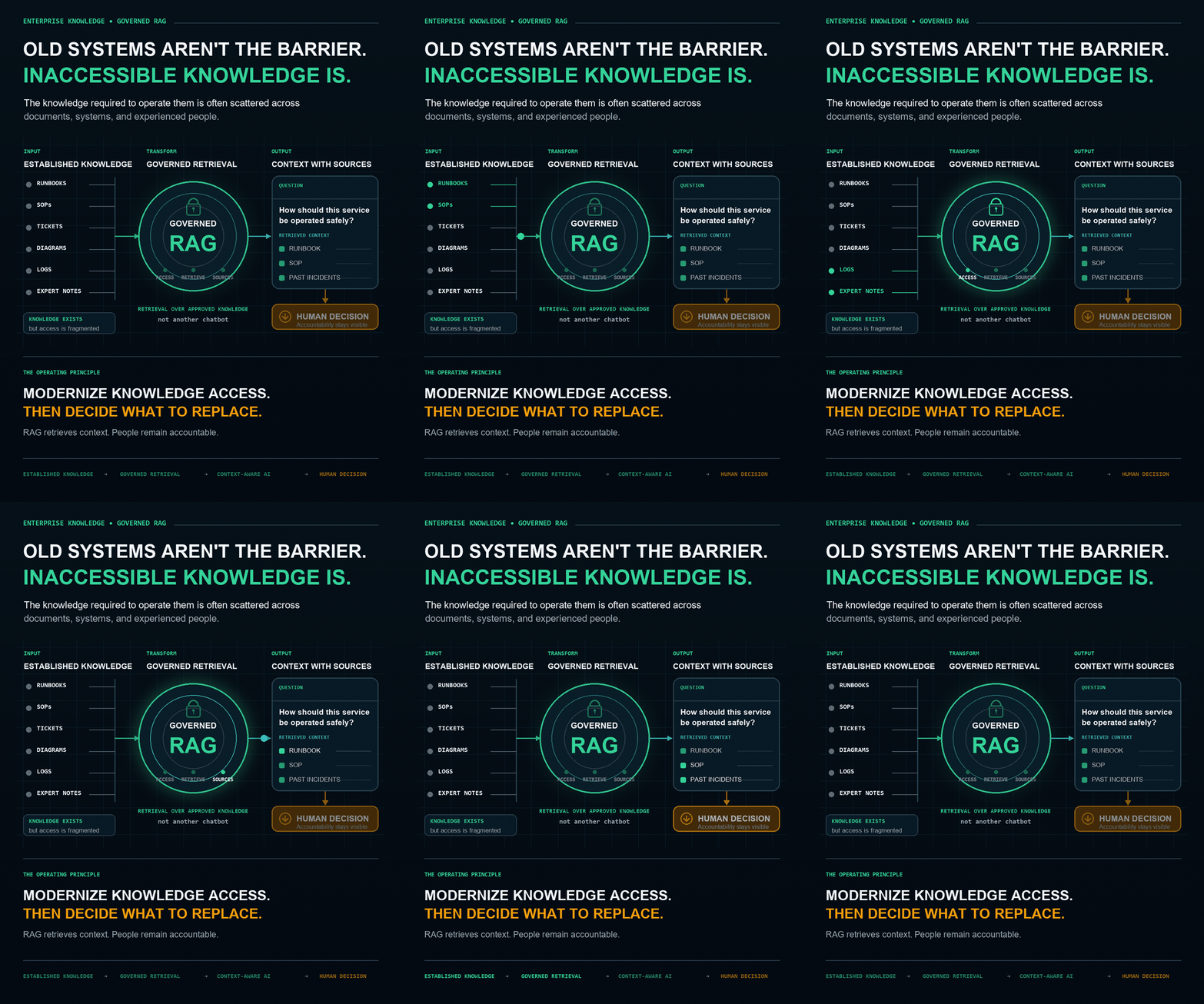
Questions people ask about leaving NAV
- Is Dynamics NAV still supported?
- Depends on the version, and the answer is worse than most people expect. NAV 2016 left extended support in April 2026 and has no support at all. NAV 2017 runs out in January 2027. NAV 2018 has been on extended support only since January 2023 and ends January 2028. Dates as published in Microsoft's lifecycle tables.
- We are on extended support, so we are fine for now — right?
- Extended support ships security fixes only. It excludes non-security updates, which means it excludes tax and regulatory updates. So an estate on NAV 2018 has been outside regulatory servicing since January 2023. That tends to surface as an audit question rather than an IT one, which is why it is usually found late.
- How long does a NAV to Business Central upgrade take?
- Nobody can answer that honestly without looking, and anyone who quotes a duration on a first call is guessing. What decides it is the number of customisations, how much of the data model was modified, and how many integrations assume the old shape. A read-only assessment gives you the scope in weeks rather than the guess.
- Should we go to Business Central online or on-premises?
- Online is where the product is going and where the growth is, but it removes direct database access — if you depend on SQL-level work or third-party tools that touch the database, that is a real constraint to plan around rather than discover. On-premises keeps that access and keeps the servicing burden. Both are defensible; the wrong move is choosing before you know which of your dependencies break.
- Is a migration the same as a modernization?
- No, and confusing them is expensive. A migration moves what you have — if the data model was wrong on-premises it is wrong in the cloud, now with a monthly bill. That is a legitimate choice, but it is a scheduling decision rather than an improvement. Modernization means something actually changes, costs more and takes longer. What is not defensible is paying modernization prices for a migration.
Find out exactly what your NAV migration takes.
Start with a fixed-fee AI Migration Readiness Assessment. You get a costed, risk-rated plan in two to three weeks — and the fee is credited if you proceed.
Learn about the Discovery Audit